
Principle of Virtual Forces: Spring support#
Computing the horizontal displacement of a spring-supported node using the Principle of Virtual Forces (PVF)
In this example, node_5 is supported by a translational spring. The spring stiffness contributes to the work equation of the node, and the horizontal displacement u of node_5 is computed by applying a virtual force in the x-direction.
The system includes bars subjected to line loads and point loads. Point loads on bars automatically create additional nodes and bar segments in the computational mesh to correctly account for their effects. The PVF method evaluates the work contributions of all bars and nodes, including spring-supported nodes, to determine the target displacement.
Additionally, the example demonstrates how to inspect:
The work matrices for all nodes and bars.
The specific contribution of an individual node or bar (including bar segments) using the
work_of(...)method. This allows detailed insight into how individual elements contribute to the overall deformation.
You can find the example as an executable Python file here.
Define the Structural System#
In this section, the static system is modeled. For a detailed step-by-step workflow, refer to the “Getting Started” example.
[1]:
# 1. Import modules
from sstatics.core.preprocessing import (
    Bar, BarLineLoad, BarPointLoad, CrossSection, Material, Node,
    NodePointLoad, System
)
from sstatics.core.calc_methods import PVF
from sstatics.core.postprocessing.graphic_objects import ObjectRenderer, SystemGeo

# 2. Define material
s253 = Material(210000000, 0.1, 81000000, 0.1)

# 3. Define cross-sections
hea_220 = CrossSection(5410 * 1e-8, 33.4 * 1e-4, 0.240, 0.120, 5/6)
heb_220 = CrossSection(8090 * 1e-8, 33.4 * 1e-4, 0.240, 0.120, 5/6)

# 4. Define nodes
n1 = Node(0, 0)
n2 = Node(4, 0)
n3 = Node(4, 3*1.5, u='fixed', w='fixed')
n4 = Node(8, 0, loads=NodePointLoad(z=4))
n5 = Node(14, 3*1.5, w=500)

# 5. Define loads and deformation components
line_load = BarLineLoad(pi=6, pj=6)
bar_point_load_1 = BarPointLoad(x=6, position=1/3)
bar_point_load_2 = BarPointLoad(x=6, position=2/3)
def_comp = 'moment'

# 6. Define bars
b1 = Bar(n1, n2, hea_220, s253,
         line_loads=line_load,
         deformations=def_comp)
b2 = Bar(n2, n4, hea_220, s253,
         line_loads=line_load,
         deformations=def_comp)
b3 = Bar(n2, n3, heb_220, s253,
         point_loads=[bar_point_load_1, bar_point_load_2],
         deformations=def_comp)
b4 = Bar(n4, n5, heb_220, s253,
         deformations=def_comp)

# 7. Assemble system
system = System(bars=[b1, b2, b3, b4])

# Visualize system
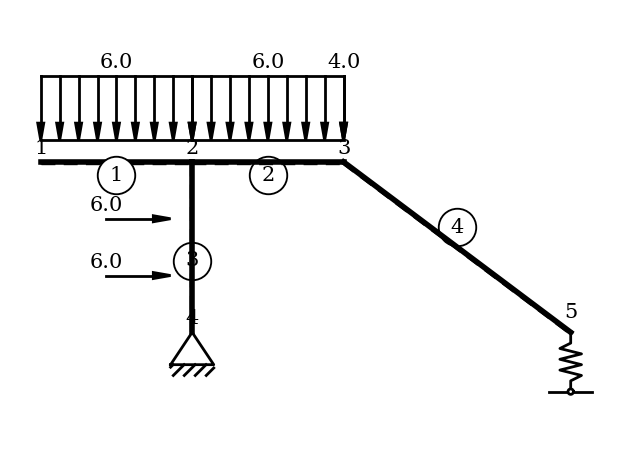
ObjectRenderer(SystemGeo(system, show_bar_text=True), 'mpl').show(show_axis=False)
Perform the Principle of Virtual Forces#
Next, we pass the modeled system to the PVF class to perform the principle of virtual forces.
[2]:
# 8. PVK calculation
pvf = PVF(system=system)
Create a Virtual Load System#
A virtual load must now be applied at the location where the deformation is to be evaluated. There are three available options for defining the virtual load:
``add_virtual_node_load`` – apply a nodal load
``add_virtual_bar_load`` – apply a bar point load
``add_virtual_moment_couple`` – apply a virtual moment couple
⚠️ Note: Only one virtual load may be applied in the virtual system.
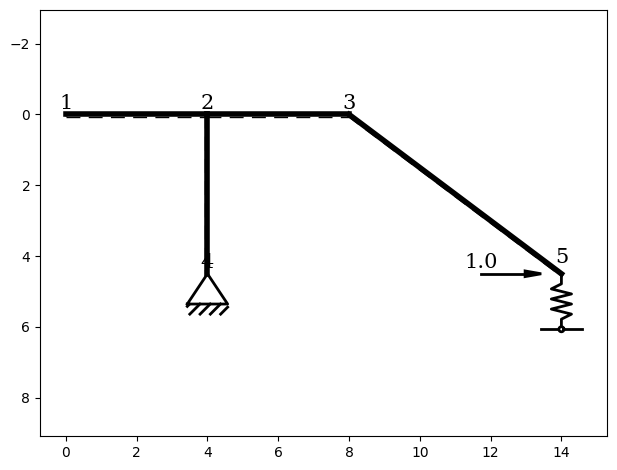
In this example, the goal is to compute the horizontal deformation at node 5. Therefore, a virtual node load in the x-direction is applied. With this, the virtual system is fully defined.
[3]:
# Apply a virtual horizontal force fx at node_5
pvf.add_virtual_node_load(n5, 'fx')

# Show virtual system
ObjectRenderer(SystemGeo(pvf.virtual_system), 'mpl').show()
Retrieve the Desired Deformation#
The requested deformation can now be obtained using the deformation() function. Depending on the material properties, cross-section parameters and the nodal coordinates provided, the deformation is returned in the corresponding unit.
[4]:
node_5_u = pvf.deformation()
print("Horizontal displacement at node 5 (PVK) [m]:", node_5_u)
Horizontal displacement at node 5 (PVK) [m]: 0.04786537971214253
Evaluation of Work Contribution#
It is possible to analyze how individual contributions affect the work equation. The provided functions give an inside the contribution for all bars or all nodes, showing how the total deformation is influenced by each type of load or internal force.
This gives a deeper understanding of the calculation, highlighting which contributions dominate the deformation.
Work Contribution of Nodes#
Now, we examine the work matrix for the nodes.
The columns represent the following contributions:
Contribution from elastic translational supports
Contribution from elastic rotational supports
Contribution from the nodal displacements (
NodeDisplacement)Contribution from the nodal rotations (
NodeDisplacement)
Each row represent a node.
Note: Point loads on bars introduce additional nodes and bar segments in the computational mesh.
The system now contains 6 bars and 7 nodes.
[5]:
# 9. Inspect work contributions
# The work matrices show how all nodes and bars contribute to the total work
# equation.

# Work contributions of all nodes
work_matrix_nodes = pvf.work_matrix(kind='nodes')
print("Work matrix (nodes):\n", work_matrix_nodes)
Work matrix (nodes):
 [[0.00000000e+00 0.00000000e+00 0.00000000e+00 0.00000000e+00]
 [0.00000000e+00 0.00000000e+00 0.00000000e+00 0.00000000e+00]
 [0.00000000e+00 0.00000000e+00 0.00000000e+00 0.00000000e+00]
 [0.00000000e+00 0.00000000e+00 0.00000000e+00 0.00000000e+00]
 [0.00000000e+00 0.00000000e+00 0.00000000e+00 0.00000000e+00]
 [0.00000000e+00 0.00000000e+00 0.00000000e+00 0.00000000e+00]
 [2.94493096e-12 0.00000000e+00 0.00000000e+00 0.00000000e+00]]
Show Work Contribution of a Specific Node#
Due to the point loads applied on the bar, the position of the originally modeled node 5 in the computational mesh has shifted to position 7.
To view the work contribution for the correct node, the function work_of() is used. The modeled node or bar is passed to the function, which maps it to the correct position in the work matrix. This ensures that the contributions correspond to the correct physical node, even if the mesh numbering has changed.
[6]:
work_n5 = pvf.work_of(obj=n5)
print("Work contribution of node 5:\n", work_n5)
Work contribution of node 5:
 [2.94493096e-12 0.00000000e+00 0.00000000e+00 0.00000000e+00]
Work Contribution of Bars#
The work_matrix function calculates the work contributions of all bars. Each column represents a specific type of contribution:
Bending moment
Normal force
Shear force
Constant temperature (\(T_s\))
Non-uniform temperature change (\(\Delta\) T)
Each row corresponds to a bar in the mesh. This makes it possible to see how the total deformation is influenced by each individual contribution.
[7]:
# Work contributions of all bars
# for better visualization change print options
import numpy as np
np.set_printoptions(
    suppress=True,    # suppress scientific notation for small numbers
)

work_matrix_bars = pvf.work_matrix(kind='bars')
print("Work matrix (bars):\n", work_matrix_bars)
Work matrix (bars):
 [[-0.          0.          0.          0.          0.        ]
 [ 0.01647742  0.          0.          0.          0.        ]
 [ 0.00893961  0.          0.          0.          0.        ]
 [ 0.00456913  0.          0.          0.          0.        ]
 [ 0.00079463  0.          0.          0.          0.        ]
 [ 0.01708458  0.          0.          0.          0.        ]]
Show Work Contribution of a Split Bar#
By default, the work_of() function sums all mesh bars that originate from the same modeled bar. However, it is also possible to inspect the individual split bars and their specific work contributions. To do this, the parameter sum=False must be used.
In this example, we examine bar 3, which has been split due to a point load applied along the bar. This provides detailed insight into how each segment of the split bar contributes to the overall deformation.
[8]:
# For bars split by point loads (e.g., bar 3), you can inspect individual
# segment contributions
work_b3_seg = pvf.work_of(obj=b3, sum=False)
print("Work contributions of bar 3 segments:\n", work_b3_seg)
Work contributions of bar 3 segments:
 [[0.00893961 0.         0.         0.         0.        ]
 [0.00456913 0.         0.         0.         0.        ]
 [0.00079463 0.         0.         0.         0.        ]]
Summed up, the total work contributions of the bar would appear as follows:
[9]:
# Or get the total contribution of all segments combined
work_b3 = pvf.work_of(obj=b3, sum=True)
print("Total work contribution of bar 3:\n", work_b3)
Total work contribution of bar 3:
 [0.01430337 0.         0.         0.         0.        ]