Influence Line: Internal Force (Mechanism)#
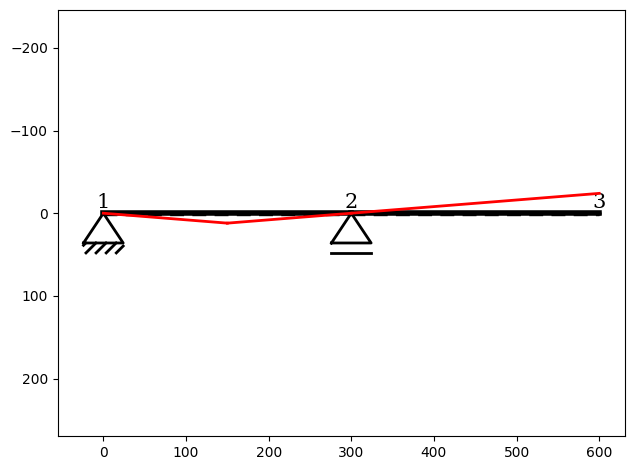
This example demonstrates how to compute the influence line for the internal force \(f_m\) at midspan of the first bar in a simple bar system when the modified structure becomes a mechanism.
Influence lines for internal forces are typically obtained by:
releasing the bar at the point where the force is to be evaluated, and
applying a unit deformation corresponding to the desired internal force quantity.
However, in this example, releasing the bar at midspan causes the structure to lose stiffness, turning it into a kinematically admissible mechanism. As a result, the system cannot be solved using the displacement method, since the stiffness matrix no longer has full rank.
In such cases, the influence line no longer corresponds to a bending line of a modified elastic system. Instead, it matches the displacement figure of the resulting rigid-body motion.
To obtain this displacement figure, a pole plan (Polplan) is constructed first. From this geometric construction, the corresponding displacement shape can be derived, which represents the influence line for the force quantity \(f_m\).
You can find the example as an executable Python file here.
Import Modules#
InfluenceLine instance:[1]:
from sstatics.core.preprocessing import (
    Node, Bar, Material, CrossSection, System
)
from sstatics.core.calc_methods import InfluenceLine
from sstatics.core.postprocessing.graphic_objects import ObjectRenderer, SystemGeo
Create System#
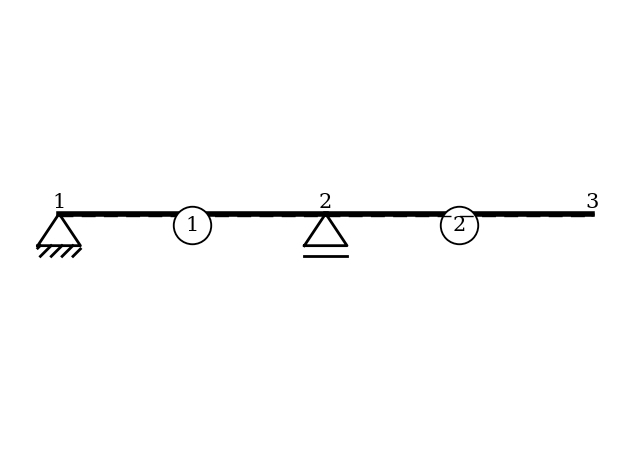
We first define the material, cross-section, nodes, and bars for the simple two-span bar system:
[2]:
# 1. Define material and cross-section
mat = Material(21000, 0.1, 8100, 0.1)          # S235
cs = CrossSection(2769, 76.84, 20, 10, 0.1)   # HEA-240

# 2. Define nodes with supports
node_1 = Node(0, 0, u='fixed', w='fixed')
node_2 = Node(300, 0, w='fixed')
node_3 = Node(600, 0)

# 3. Define bars and system
bar_1 = Bar(node_1, node_2, cs, mat)
bar_2 = Bar(node_2, node_3, cs, mat)
system = System([bar_1, bar_2])

# Visualize system
ObjectRenderer(SystemGeo(system, show_bar_text=True), 'mpl').show(show_axis=False)
Create Influence-Line#
We now create an InfluenceLine object that performs the computation:
[3]:
# 4. Define Influence line
il = InfluenceLine(system)
Compute Influence Line for Internal Force \(f_m\)#
To compute the influence line of the internal force \(f_m\) at the midpoint of the first bar, we specify:
force type:
'fm'object:
bar_1local position = 0.5 (midspan)
[4]:
il.force(kind='fm', obj=bar_1, position=0.5)