Influence Line: Internal Force#
This example demonstrates how to compute the influence line for the internal force \(f_m\)
at midspan of the first bar in a simple two-span bar system.
Unlike influence lines for displacements (which require applying a unit force or moment),
influence lines for internal forces work differently:
- To obtain the influence line of an internal force in a bar,the structure is opened (released) at the position where the force is to be evaluated.
A unit deformation, corresponding to the sought force quantity, is then applied at the released location.
If this modified system remains stable and solvable using the displacement method,
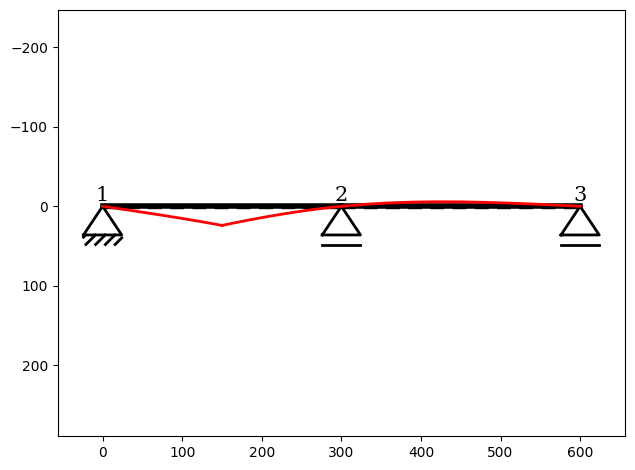
the resulting deformation field of the system corresponds directly to the influence line
of the internal force quantity.
In this example, the system does remain stable, so the resulting curve is simply the
bending line (deflection shape) of the modified structure.
You can find the example as an executable Python file here.
Import Modules#
We start by importing the required classes needed to set up the structure and define the
InfluenceLine instance:[1]:
from sstatics.core.preprocessing import (
    Node, Bar, Material, CrossSection, System
)
from sstatics.core.calc_methods import InfluenceLine
from sstatics.core.postprocessing.graphic_objects import ObjectRenderer, SystemGeo
Create System#
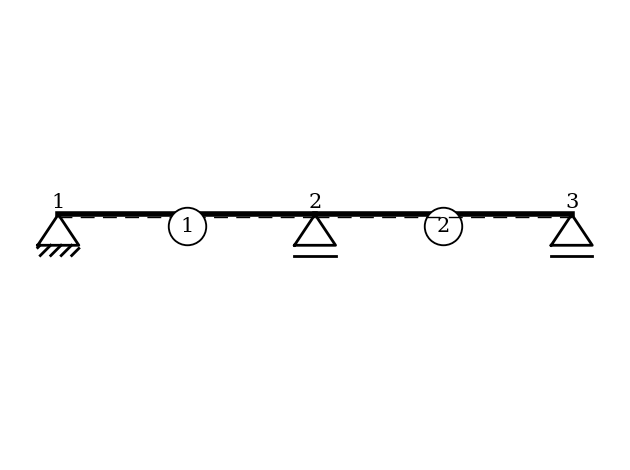
We first define the material, cross-section, nodes, and bars for the simple two-span bar system:
[2]:
# 1. Define material and cross-section
mat = Material(21000, 0.1, 8100, 0.1)          # S235
cs = CrossSection(2769, 76.84, 20, 10, 0.1)   # HEA-240

# 2. Define nodes with supports
node_1 = Node(0, 0, u='fixed', w='fixed')
node_2 = Node(300, 0, w='fixed')
node_3 = Node(600, 0, w='fixed')

# 3. Define bars and system
bar_1 = Bar(node_1, node_2, cs, mat)
bar_2 = Bar(node_2, node_3, cs, mat)
system = System([bar_1, bar_2])

# Visualize system
ObjectRenderer(SystemGeo(system, show_bar_text=True), 'mpl').show(show_axis=False)
Create Influence-Line#
We now create an InfluenceLine object that performs the computation:
[3]:
# 4. Define Influence line
il = InfluenceLine(system)
Compute Influence Line for Internal Force \(f_m\)#
To compute the influence line of the internal force \(f_m\) at the midpoint of the first bar, we specify:
force type:
'fm'object:
bar_1local position = 0.5 (midspan)
[4]:
il.force(kind='fm', obj=bar_1, position=0.5)