
Cross-Section: Beam with a Slab#
The following example demonstrates how a cross-section object can be created from a combination of polygons.
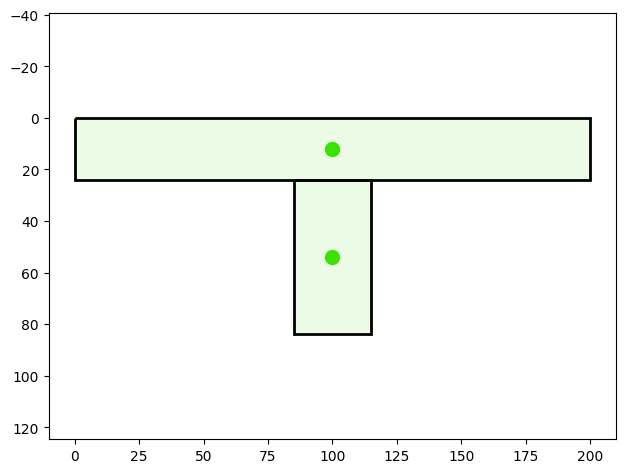
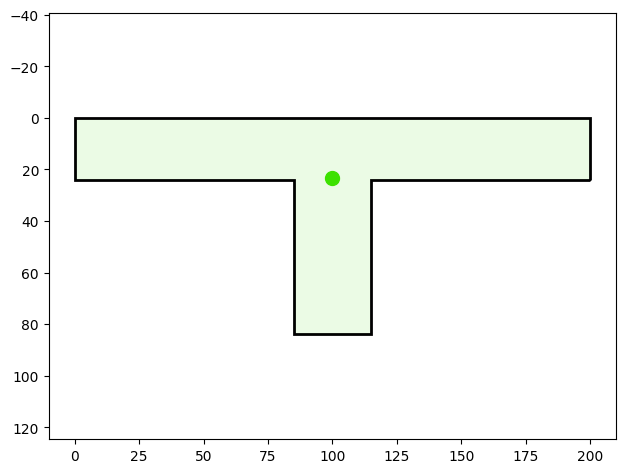
Create a cross-section representing a beam topped with a slab. The slab is defined as a polygon 24 units thick, while the beam underneath is defined as a polygon 30 units wide and 60 units high. By combining these polygons into a single cross-section, the characteristic shape of a slab supported by a beam is formed.
Finally, the cross-section is visualized.
You can find the example as an executable Python file here.
Import Modules#
We start by importing the required classes for defining and visualizing the cross-section.
[1]:
from sstatics.core.preprocessing.geometry import Polygon
from sstatics.core.preprocessing import CrossSection
from sstatics.core.postprocessing.graphic_objects import CrossSectionGeo, ObjectRenderer
Create Geometry#
First, we define the polygons that describe the cross-section:
One polygon defines the slab at the top of the section with a thickness of 24 units.
Another polygon defines the beam underneath with a width of 30 units and a height of 60 units.
[2]:
# Slab: width = 200, thickness = 24
slab = Polygon([(0, 0), (200, 0), (200, 24), (0, 24), (0, 0)])

# Beam: width = 30, height = 60, centered under the slab
beam = Polygon([(85, 24), (115, 24), (115, 84), (85, 84), (85, 24)])
Create Cross-Section#
By combining these polygons, we create a cross-section representing a slab supported by a beam. This cross-section can later be used to calculate mechanical properties such as area, centroid, and moments of inertia.
[3]:
# Combine polygons into one cross-section
beam_with_slab = CrossSection(geometry=[slab, beam])
Visualize Cross-Section#
The generated cross-section can then be visualized using the CrossSectionGraphic class.
By default, the merged parameter controls whether individual polygons are displayed separately or combined into a single geometry:
merged=Falsedisplays the individual polygons (e.g., slab and beam) separately.merged=Truecombines all polygons and displays the overall cross-section as a single shape.
[4]:
# Visualize the geometry-object that create the cross-section
ObjectRenderer(CrossSectionGeo(beam_with_slab, merged=False), 'mpl').show()
[5]:
# Visualize the cross-section
ObjectRenderer(CrossSectionGeo(beam_with_slab), 'mpl').show()
Calculate cross-section properties#
[6]:
# 5. Extract geometric properties
A = beam_with_slab.area
y_s = beam_with_slab.center_of_mass_y
z_s = beam_with_slab.center_of_mass_z
Iy = beam_with_slab.mom_of_int
width = beam_with_slab.width
height = beam_with_slab.height

(yb, zb) = beam_with_slab.boundary()
y_bottom, y_top = yb[0], yb[1]
z_top, z_bottom = zb[0], zb[1]

# 6. Print results
print("=== Composite Cross-Section: Beam with Slab ===")
print(f"Area A                     : {A:.4f}")
print(f"Centroid y_s, z_s         : ({y_s:.4f}, {z_s:.4f})")
print(f"Moment of inertia Iy      : {Iy:.4f}")
print(f"Width, Height             : {width:.4f}, {height:.4f}")
print(f"Boundary in y-direction   : bottom = {y_bottom:.4f},"
      f" top = {y_top:.4f}")
print(f"Boundary in z-direction   : top = {z_top:.4f},"
      f" bottom = {z_bottom:.4f}")
=== Composite Cross-Section: Beam with Slab ===
Area A                     : 6600.0000
Centroid y_s, z_s         : (100.0000, 23.4545)
Moment of inertia Iy      : 3079636.3636
Width, Height             : 200.0000, 84.0000
Boundary in y-direction   : bottom = 0.0000, top = 200.0000
Boundary in z-direction   : top = 0.0000, bottom = 84.0000